Meta Ads Library: how to use it to research competitor ads
The Meta Ads Library shows every ad running on Facebook and Instagram, for free. Here is how to search it, what each ad tells you, what it hides, and how to turn what you find into your own ads.
Checked against the sources below on November 1, 2026.
What is the Meta Ads Library?
The Meta Ads Library (still often called the Facebook Ad Library) is Meta's free, public search engine for ads. It shows the ads running across Meta's apps, including Facebook, Instagram, Messenger and Audience Network, for any advertiser, in any country where they run.
Meta built it for transparency, but for advertisers it is the best free source of competitor research there is: you can see exactly which ads a brand is running today, how many versions it is testing and how long each ad has been live.
You can open it at facebook.com/ads/library. Searching does not require an ad account.
What the library shows, and for how long
What you can see depends on the type of ad and where it ran. This is the part most guides get wrong:
| Type of ad | Which ads you see | Extra data shown |
|---|---|---|
| Most commercial ads (outside the EU) | Only ads that are running now | Creative, copy, start date, platforms, versions. No spend or results. |
| Ads about social issues, elections or politics | Active and inactive, kept for 7 years | Spend range, impressions range, audience age, gender and location, who paid |
| Ads shown to people in the EU | Active and inactive, kept for a year after they last ran | Targeting (location, age, gender) and estimated reach, under the EU Digital Services Act |
So for an ordinary brand outside the EU, an ad disappears from the library once it stops. If you want to keep an ad for reference, save it while it is live.
How to search the Meta Ads Library, step by step
- Choose a country. Ads appear under the countries they are delivered in, so pick the market you care about, or "All" to see everything.
- Choose an ad category. "All ads" covers commercial ads; "Issues, elections or politics" is the separate political archive.
- Search by advertiser or keyword. Type a brand name and pick its Page from the dropdown to see every ad from that Page. Type a keyword instead to see ads from every advertiser whose ad text matches.
- Use quotes for an exact phrase. Searching "back pain" in quotation marks returns ads with that phrase, not every ad that mentions back or pain.
- Filter the results: language, advertiser, platform (Facebook, Instagram, Messenger, Audience Network), media type (images, videos, memes, ads without media), active status and the date range ads were shown.
- Open "See ad details" on an ad to see all its versions and, for EU or political ads, the extra transparency data.
Shortcut: on any Facebook Page, the "Page transparency" section links straight to that Page's ads in the library.
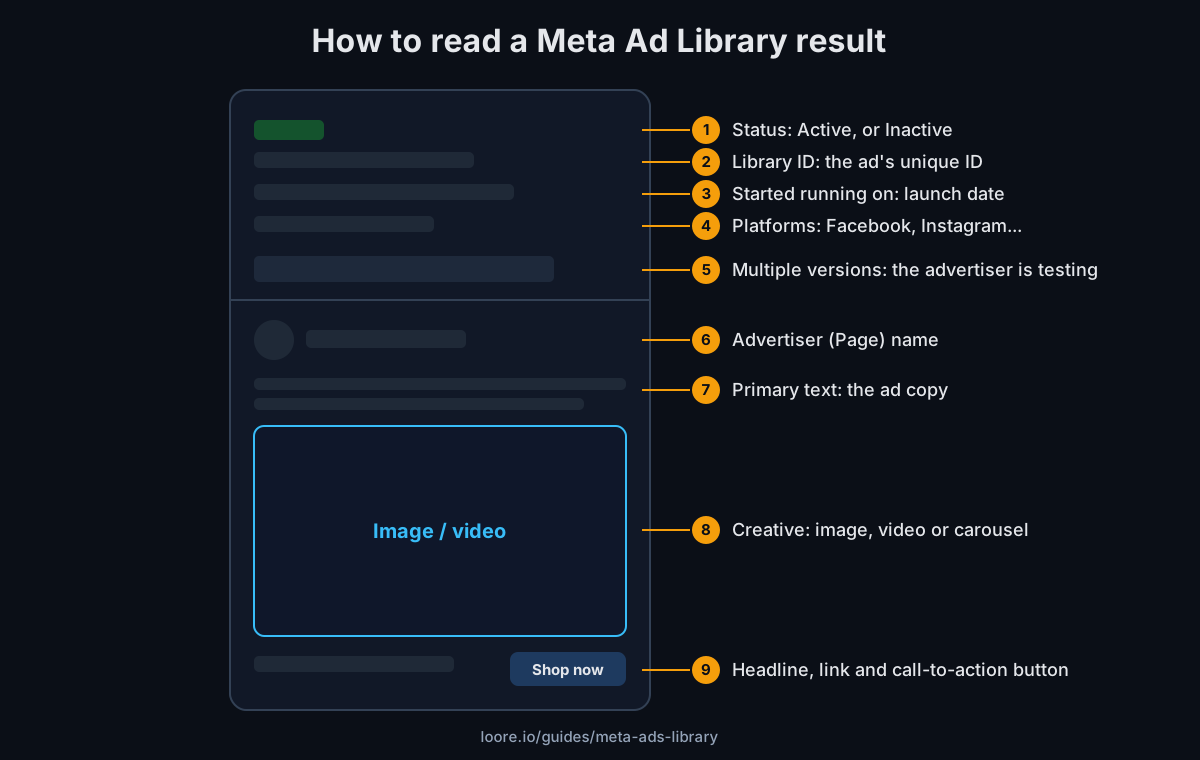
How to read an ad in the library
- Status: Active means the ad is running today.
- Library ID: a unique number for the ad, useful for sharing or saving a reference.
- Started running on: the date the ad launched. With today's date, this tells you how long it has been live.
- Platforms: where the ad is shown. An ad on Instagram only is often built for Stories or Reels.
- "This ad has multiple versions": the advertiser is running several variations under one ad, usually different images, videos or text. Open it to see every version.
- The creative, primary text, headline and call-to-action button: the ad exactly as people see it.
How to tell which competitor ads are working
The library shows no results for commercial ads: no spend, clicks, sales or ROAS. You have to read signals instead, and each one is a clue, not proof:
- Run time. An ad that has been running for months is one the advertiser keeps paying for, which usually means it pays back. It is a strong hint, not a guarantee: some brands leave ads on by habit, and a new ad can be a winner too.
- Many versions of one idea. When a brand runs the same concept in many variations, it is usually scaling something that works.
- Repetition across the account. A hook, offer or format that keeps coming back in new ads is one the brand believes in.
- Fresh ads in volume. A burst of new ads around one theme shows what the brand is testing right now.
Combine the signals. One long-running ad with several versions and a hook that shows up in the brand's newest ads is about as close to a confirmed winner as public data gets.
Turn competitor ads into your own ad ideas
- Write down what the ad does, not what it says: the hook type, the format (UGC, static, demo, before and after), the offer and the call to action.
- Group what you find by angle: pain, curiosity, social proof, transformation, urgency. Gaps in a competitor's angles are openings for you.
- Note the run time with each ad you save. A saved ad without its dates loses most of its value.
- Turn each pattern into a test: "Our product, their winning format, our own angle." Never copy an ad's words or visuals; use the structure, not the content.
- Check results in your own account. A competitor's winner is a starting point, not a promise. Measure it with your own CTR and CPA.
Need opening lines for your version? The free hook generator writes three hooks per angle.
What the Meta Ads Library cannot do
- No performance data for commercial ads: no spend, impressions, clicks or sales outside the EU and political ads.
- No history: outside the EU, an ad vanishes when it stops running.
- No saving or organizing: there are no boards, tags or notes.
- No alerts: you have to check back by hand to see a competitor's new ads.
- No search by meaning: keyword search matches the words in the ad text, so it misses ads that make the same point in other words.
Other ad libraries worth knowing
- Google Ads Transparency Center: search and display ads from Google, YouTube and its partners.
- TikTok Ad Library (Commercial Content Library): TikTok ads, with more detail for ads shown in Europe.
- LinkedIn Ad Library: ads run on LinkedIn.
Research competitor ads by meaning, not just keywords. Loore's AI Researcher searches the competitor ad library for ads that match your product, and its Copywriter and Designer turn what works into new ads for you.
Start free